
See which jobs are making money and why
Find the jobs whose margin needs attention in Profitability reporting, then open Job Financials to compare job value, invoicing, labour, purchasing and projected profit before you act.
Step by step
- Open Reports in the top navigation and select Job Profitability under Standard reports; the Job profitability table lists every job.
- Use the filter to show Margin below 20% or Unbilled value, and read the Data check column before trusting any row.
- Select the job number to open the job on its Financials tab.
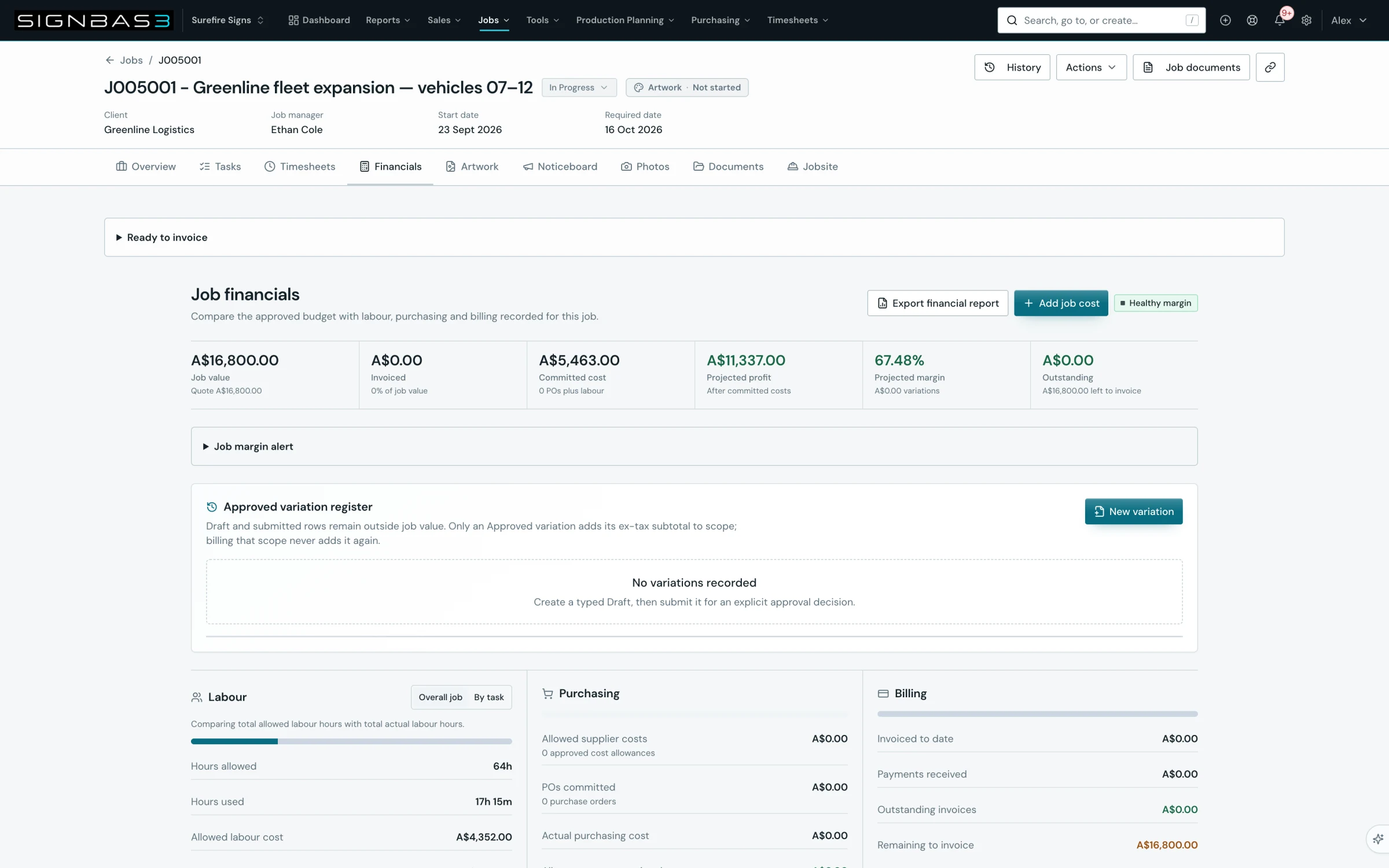
- Read the KPI strip: Job value, Invoiced, Committed cost, Projected profit, Projected margin and Outstanding, plus the margin badge in the header.
- Compare the Labour, Purchasing and Billing panels to see whether hours, supplier costs or invoicing explain the margin.
- Check Job costs and purchase orders, Invoices and Purchase orders, and select Add job cost for any cost incurred without a purchase order.
- Resolve every row in Labour cost review, then select Export financial report to keep a PDF or CSV of the position you reviewed.
Good practice
Treat a Review required value as missing evidence, not as zero. SignBas3 marks a job value, cost or invoice that cannot be proven rather than assuming it, so reconcile the underlying record first and only then compare the margin with the estimate.
Before you begin
- Labour rates are configured so recorded time carries a cost.
- Purchase orders, supplier costs and invoices for the job are recorded in SignBas3.
Complete workflow
How the workflow moves
- 01Scan the organisation
Use Profitability reporting to list every job's value, cost, margin and unbilled value, filtered to margin risk or unbilled value.
- 02Open the job
Follow the job link into Job Financials and read the KPI strip and evidence warnings.
- 03Trace the cause
Compare the Labour, Purchasing and Billing panels with the job's costs, purchase orders and invoices.
- 04Record and act
Add missing costs, resolve labour review items, and export the financial report for the review record.
Setup dependency
Settings that change this workflow
The same task can behave differently between organisations. Check these settings before treating a different result as an error.
/settings/labour-ratesSets the hourly cost applied to recorded time, which drives Actual labour cost and the labour variance.
Open in SignBas3 →Screen reference
What you will see
What this controls
Profitability reporting at /reports/profitability is the organisation view: one row per job with Job value, Invoiced, Recorded cost, Gross profit, Margin, Unbilled and a Data check. Job Financials on each job is the detailed view that compares the approved budget with the labour, purchasing and billing recorded for that job. Together they show which jobs need attention and why, and they feed the close-out review in Close a job and review performance.
Before you start
- Profitability reporting needs an active organisation and read access to job financial records.
- Labour cost depends on the rates in Settings > Labour Rates and on time entries that resolve to a staff member and task.
- Supplier costs come from purchase orders and from manual job costs; invoices come from the job's linked invoices.
Walkthrough
Step 1: Open Profitability reporting
The Reports menu lists Work in Progress, Production Priorities, Job Profitability, Aged Receivables and Decision Exceptions under Standard reports; Job Profitability opens the live view directly. Once a live view is open, the Live reporting bar switches between Overview, Production, Profitability, Financials and Decisions, and the header offers Report library, Export PDF and Refresh. The Certified reporting sources card names the sources and the generated time. The Job profitability card notes that missing or incomplete evidence is shown as unavailable, not as zero margin. The Job profitability tile under Standard reports on the Reports page is different: it starts a custom report in the builder from the same data.
Step 2: Filter and read the Data check
The filter offers All jobs, Margin below 20% and Unbilled value. Margin is shown as a percentage badge and highlighted below 20%. Data check reads Ready, Missing job value, Missing invoice value, Costs need reconciliation or Variations need reconciliation. Financial cells show a dash until the row is Ready. Previous and Next page through long lists, and Export PDF saves the filtered table as a dated file.
Step 3: Open Job Financials
The job number links straight to the Financials tab, whose heading reads Job financials beside Export financial report and Add job cost. While the authoritative snapshot loads, a status line says the workspace remains available. If the projection cannot be loaded, Financial information unavailable appears with Try again and no backup values are substituted.
Step 4: Read the KPI strip
Job value shows the approved value; Invoiced shows the percentage of job value billed; Committed cost counts purchase orders plus labour; Projected profit is after committed costs and reads Projected loss when negative; Projected margin shows approved variations beside it; Outstanding shows unpaid invoices and the amount left to invoice. The header badge reads Healthy margin at 30% or more, Margin watch from 20%, Margin risk below that, or Evidence review when records need reconciliation.
Step 5: Compare the three panels
Labour compares Hours allowed with Hours used and Allowed labour cost with Actual labour cost, and reports Labour over budget or Labour saving; switch between Overall job and By task. Purchasing shows Allowed supplier costs, POs committed, Actual purchasing cost, Allowance not committed and Actual cost without PO. Billing shows Invoiced to date, Payments received, Outstanding invoices and Remaining to invoice. The Approved variation register above them lists scope changes with their status.
Step 6: Check the detail and add costs
Job costs and purchase orders reconciles each allowance to its PO commitment; Add cost opens the Add job cost dialog with Cost treatment set to Allowed cost — budget or Actual cost — no purchase order, plus Description, Category, Quantity, Unit cost before tax and Note, and Job cost added confirms it. Invoices lists each invoice with Status, Date, Before tax, Tax, Including tax and Outstanding. Purchase orders offers Issue purchase order, a Search purchase orders box with supplier, status and sort filters, and totals for Total POs, Total before tax and Attention required.
Step 7: Resolve labour review and export
Labour cost review appears when time entries could not be costed, listing Staff, Job, Task, Time entry, Issue and Next step with Staff record, Labour rate and Time entry links. Export financial report opens Export job financial report, where you tick Costs, Labour, Invoices, Purchase orders and Noticeboard notes, choose PDF or CSV and select Export PDF or Export CSV.
What changes elsewhere
- A cost added with Add job cost changes Committed cost and Projected profit on the job at /jobs/:id/financials and the row in Profitability reporting.
- Resolving a Labour cost review row updates Actual labour cost once the time entry is costed.
- Export PDF on the Profitability view records the filter you used in the file title, so a Margin below 20% snapshot is labelled as such.
Common problems
| Symptom | Cause | Fix |
|---|---|---|
| Data check reads Missing job value | The job has no approved value. | Confirm the accepted quote or approved job value on the job. |
| Costs need reconciliation | A cost record lacks evidence. | Open Job costs and purchase orders and complete the record. |
| Financial evidence requires review | Saved financial records need reconciliation. | Values are marked Review required; fix the listed records rather than assuming zero. |
| Labour cost review shows unresolved rows | Time entries could not be matched to a rate or task. | Follow the Next step link to the staff record, labour rate or time entry. |
| Financial information unavailable | The certified projection did not load. | Select Try again. |
Check your work
- The job's Data check in Profitability reporting reads Ready.
- The header badge on Job Financials no longer reads Evidence review and Labour cost review is empty.
- The exported financial report lists the costs, labour, invoices and purchase orders you reviewed.
If your workspace behaves differently, record the relevant job, client or record number and raise a support ticket so the team can investigate the exact context.