
Production scheduling
Sign production scheduling software that turns live jobs into an achievable plan.
Plan design, prepress, print, fabrication, finishing and installation from the current job record, with readiness, remaining effort, staff capability, existing work and fixed commitments visible together.
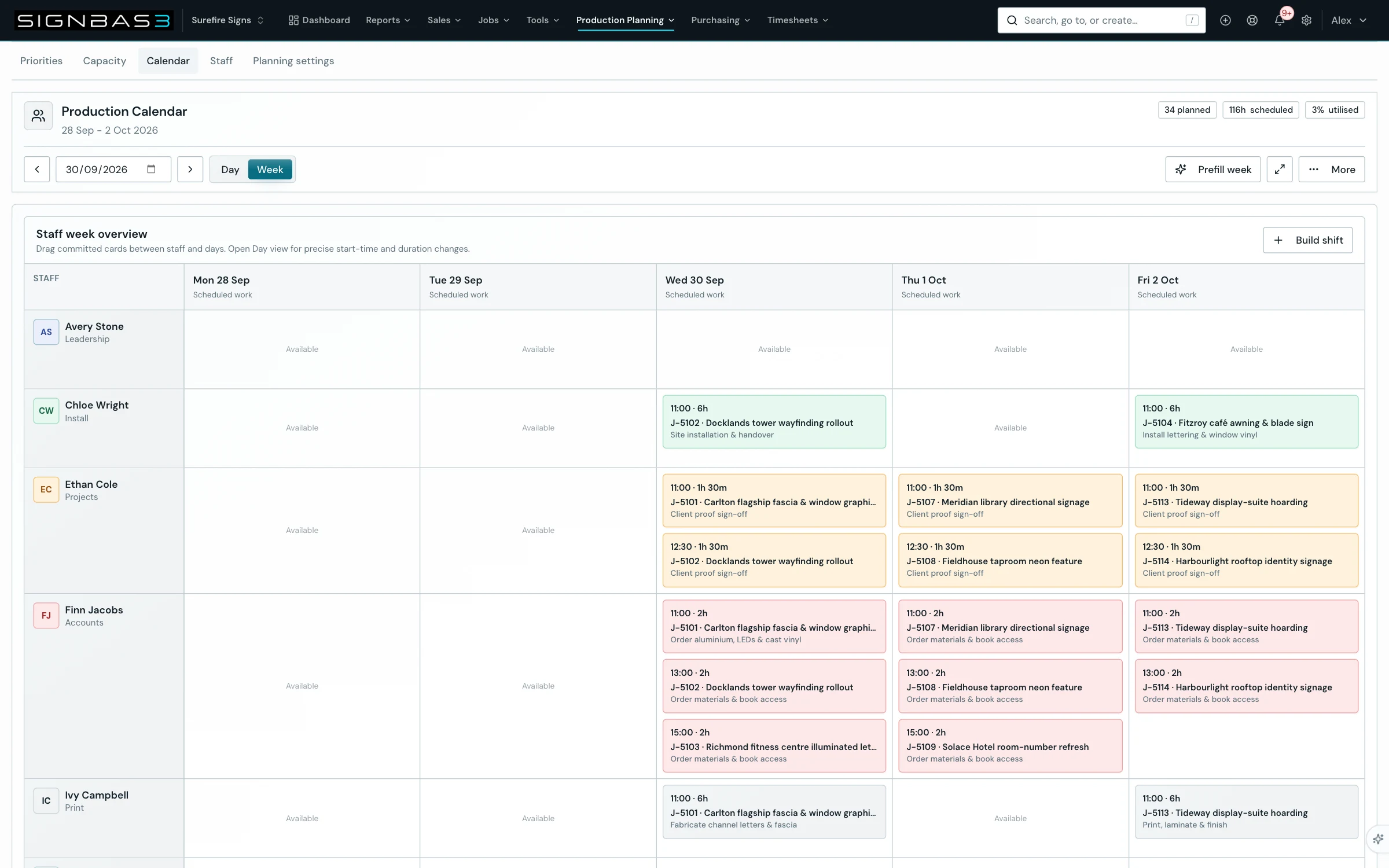
A draft grounded in current work
Fitch considers incomplete canonical tasks, remaining hours, due dates and the schedule already in place.
Every match can be inspected
Review the proposed person, job, task, time, confidence and reason before committing anything.
The planner stays in charge
The tenant opts in and an authorised administrator applies or discards the proposal.
A practical workflow
What it looks like in use.
- 01 · Choose the week
Open day or week planning and confirm the work in scope.
- 02 · Ask Fitch for a draft
Analyse available history, staff capability, open tasks and current bookings.
- 03 · Interrogate every block
Review confidence, reasoning, warnings and any work left unscheduled.
- 04 · Apply or discard
Revalidate the draft against current data, then commit it or throw it away.
The live production plan
Schedule work the workshop can actually execute.
A calendar can show that something is due on Friday. It cannot tell the team whether artwork is approved, material has arrived, the right operator is available, predecessor work is complete or the installation date leaves enough time for production. SignBas3 connects the schedule to the job records that answer those questions.
Every scheduled block remains recognisable as customer work. The planner can move between the portfolio view and the underlying job, task, due date, remaining effort, assigned people and current operational context without rebuilding the week from a whiteboard and several private lists.
Explore sign job management → · Explore production management →
What sign production scheduling software should bring together
| Planning question | What the scheduler needs | SignBas3 connection |
|---|---|---|
| What work exists? | Current jobs, incomplete tasks, customer commitments, priorities, due dates and remaining effort. | The production plan starts from canonical job tasks instead of a second manually maintained task list. |
| Is the work ready? | Accepted scope, approved artwork, materials, purchased inputs, predecessor tasks, files and unresolved blockers. | Scheduling remains connected to estimating, artwork, purchasing and the live job status. |
| Who can do it? | People, teams, capability, available hours, leave, current assignments and work already in progress. | The planner can match the task with the people able to complete it while seeing their existing commitments. |
| What is fixed? | Customer deadlines, site bookings, installations, deliveries and other commitments that constrain the production sequence. | Fixed work stays visible beside flexible workshop tasks so the plan can work backwards from the real commitment. |
| Where is capacity tight? | Demand across design, prepress, printing, fabrication, finishing, quality and installation compared with available time. | Day and week views expose collisions and unplaced work before the deadline becomes an emergency. |
| What changed? | New priorities, revised effort, delayed material, artwork changes, absence, breakdowns and completed work. | The schedule can be reviewed against current job data instead of remaining frozen after the planning meeting. |
From sold work to scheduled work
Build the week from the operational truth.
- 01 · Start with accepted jobs
Carry the customer commitment, products, specifications, due dates, delivery path and estimated work from the accepted quote into the job.
- 02 · Break work into executable tasks
Plan design, prepress, print, routing, fabrication, assembly, finishing, quality, packing, delivery and installation at the level the team can own and complete.
- 03 · Confirm readiness
Check artwork approval, required files, materials, supplier inputs, predecessor work and site information before treating a task as executable.
- 04 · Review demand and capacity
Compare incomplete work and remaining effort with available people, team capability, current assignments, leave and fixed bookings.
- 05 · Place the achievable work
Schedule tasks across the day or week with the responsible person, job context and expected time visible, while keeping collisions and unplaced work available for action.
- 06 · Run production from the current plan
Let the team open the underlying job, complete tasks, record progress and leave current evidence for the next department rather than updating a decorative calendar.
- 07 · Replan when reality changes
Respond to an artwork revision, missing stock, urgent job, staff absence or delayed site by reviewing the affected work and protecting the commitments that still matter.
- 08 · Feed the commercial result
Keep actual labour, purchasing, production evidence and installation activity connected so schedule performance and job margin can improve the next estimate.
One schedule, different capabilities
Plan mixed sign work without pretending every task is interchangeable.
A vehicle wrap waiting for design, a banner ready for print, fabricated lettering in assembly and a wayfinding package booked for installation may share a due week, but they do not compete for the same capability. SignBas3 keeps the common job structure while the tasks describe what each piece of work requires.
That matters when a business spans sales, design, wide-format print, routing, fabrication, electrical assembly, finishing and field crews. Managers can see the whole workload while each team receives a useful production queue.
Production board, staff calendar and job schedule are connected views
A production board answers where work sits in the workflow. A staff calendar answers who is committed and when. A job schedule connects those views to the exact task, remaining work, readiness and delivery promise. SignBas3 keeps the views tied to the same job so moving a card or completing a task changes the operating picture rather than another spreadsheet.
The result is useful at different altitudes. An owner can review workload, risk and capacity across the business. A production manager can decide what runs next. A team member can open the assigned work and see the current scope, files and requirements.
Readiness before urgency
Expose blockers while there is still time to act.
A task can be important and still not be ready. Artwork may be awaiting approval, ACM may be on order, a survey measurement may be missing or a predecessor fabrication step may still be open. Keeping the reason visible lets the planner advance another executable task and gives the responsible person a clear action to release the blocked work.
Unscheduled work also remains visible. A full week should not make the remaining demand disappear; it should show the manager which jobs need changed priorities, extra capacity, a revised promise or removal of a blocker.
Test production scheduling software with a real sign-shop week
- Choose active work across design, print, fabrication, finishing and installation with different due dates and effort.
- Include an approved job, a task waiting on artwork, a purchased material not yet received and one fixed site booking.
- Add realistic staff capability, existing assignments and leave.
- Build the week and confirm every block opens the correct customer job and production task.
- Check that conflicts, constrained capacity and work that could not be placed remain visible.
- Change a priority, delay a material and complete a task, then review whether the current plan responds coherently.
- Record actual work and confirm it contributes to job costing and future estimating.
Fitch prepares; the planner decides
Use an explainable draft to accelerate the first pass.
For opted-in tenants, Fitch can prepare a review-only week from incomplete tasks, remaining effort, due dates, staff capability, available history and the schedule already in place. The proposal shows the person, job, task, time, confidence, reason, warnings, conflicts and work left unscheduled.
An authorised administrator reviews, edits, applies or discards the proposal. Current canonical data is checked again before approved blocks are written, preserving the planner's control when the underlying week has changed.
Questions sign production teams ask
Is production scheduling the same as job management?
No. Job management holds the accepted scope, artwork, tasks, purchases, files, field evidence, costs and decisions. Scheduling places the executable parts of those jobs across time, people and capacity. SignBas3 connects both around the same record.
Can the schedule include production and installation?
Yes. Design, workshop, delivery and installation tasks can be planned with their different capability and readiness requirements while fixed field commitments remain visible.
What happens when work is not ready or cannot fit?
The task and its blocker or unscheduled state remain visible for review. Managers can clear the input, change priority, add capacity or revise the commitment instead of losing the work outside the week.
Does scheduling connect with timesheets and job costing?
Yes. Planned work stays attached to the job, and approved actual labour contributes to estimated-versus-actual review alongside materials, purchasing, production and installation.