
Invoicing & job financials
Sign shop job costing software that shows where the margin went.
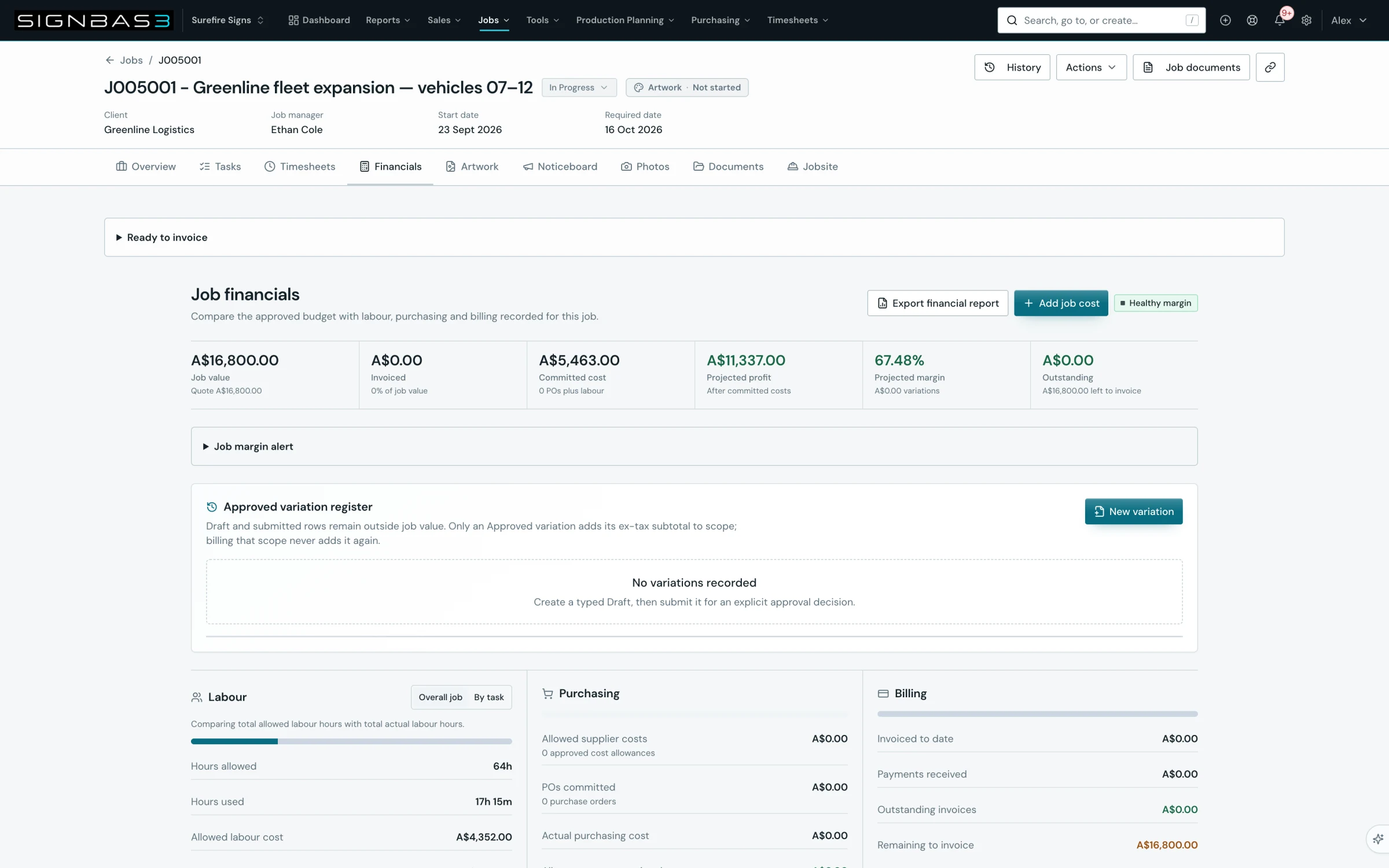
Compare the accepted estimate with actual labour, materials, purchases, production, installation and invoicing while the operational evidence is still attached to the job.
Clear invoice state
See draft, awaiting payment, part-paid, overdue and paid together.
Commercial context
Check the invoice back to the quote and job it belongs to.
Useful margin signals
Review value, cost and variance before the memory of the job fades.
A practical workflow
What it looks like in use.
- 01 · Keep the scope current
Start from the accepted commercial work.
- 02 · Record cost as it happens
Bring time and purchasing into the job.
- 03 · Prepare the invoice
Issue progress or final billing with the job attached.
- 04 · Review the result
Understand material variance and improve the next job.
Estimate versus actual
Turn every completed sign job into a better commercial decision.
A final invoice can show what the customer owes, but it cannot explain whether the work performed as expected. SignBas3 keeps the accepted commercial baseline beside the labour, materials, supplier spend, production evidence, field work and invoicing that created the actual result.
That connection lets management see more than a top-line total. The team can identify which part of the job moved, trace the operational reason, and use the result when pricing similar work again.
Explore sign estimating and quoting → · Explore sign job management →
What sign shop job costing software should compare
| Costing area | Commercial baseline | Actual job evidence |
|---|---|---|
| Revenue and scope | The accepted quote revision, approved products, quantities, options, delivery commitments and customer value. | Progress and final invoicing, approved changes, credits and the payment state associated with the job. |
| Labour | Estimated effort and cost across design, prepress, print, fabrication, finishing, administration and installation. | Job-linked time and labour cost recorded against the work people actually completed. |
| Materials and production | Allowed substrates, consumables, hardware, LEDs, ink, media and other manufacturing inputs. | Recorded materials and connected production evidence that help explain real consumption and output. |
| Purchasing and subcontracting | Supplier allowances for bought-in materials, specialist fabrication, freight, access equipment and outside services. | Purchase orders, received items, supplier bills and actual supplier cost retained against the job. |
| Installation and delivery | Planned travel, crew effort, equipment, delivery and site work included in the sold scope. | Field activity, completion evidence, additional effort and exceptions returned from the installation workflow. |
| Margin and variance | The contribution expected when the quote was accepted. | The difference between accepted revenue and the operational costs recorded while delivering the work. |
A live commercial thread
Cost the job from the records created while it runs.
- 01 · Preserve the accepted estimate
Keep the current quote revision, sold scope, products, labour, materials, supplier allowances, delivery and installation as the commercial baseline.
- 02 · Carry the baseline into the job
Let artwork, production, purchasing and field teams work from the same accepted record instead of recreating the scope in separate systems.
- 03 · Capture operational actuals
Record labour, materials, purchase orders, receipts, supplier costs, production evidence and installation activity against the correct job.
- 04 · Keep approved changes visible
Retain the relationship between revised scope, additional work, customer decisions and the invoice so legitimate change is not mistaken for unexplained cost.
- 05 · Invoice the completed value
Prepare progress or final billing from the approved commercial work and retain the current draft, issued, part-paid, overdue or paid state.
- 06 · Review the variance
Compare estimate and actual by the major cost drivers, identify the operational reason, and carry useful learning into the next quote.
Read margin while the job is still understandable
Waiting until month-end to reconstruct a job from payroll, supplier statements, production notes and memory weakens the answer. SignBas3 keeps actuals close to the work so managers can review developing cost and missing evidence before everyone has moved on.
A current view also separates different commercial conditions. A job may be profitable but not yet paid. It may have strong revenue but unrecorded supplier cost. It may be operationally complete while a final invoice is still in draft. These states belong together, but they should not be confused with one another.
Variance with a reason
Find the operational cause behind the number.
A useful costing review does not stop at “labour over” or “materials over.” It asks why. Was artwork revised after approval? Did production use a different material? Was outside supply missing from the estimate? Did site access extend the installation? Was the customer change approved and invoiced?
The job record provides the context: quote revisions, artwork decisions, tasks, files, purchases, production evidence, field notes and correspondence. That evidence turns a disappointing result into a pricing, process or scope-control improvement.
Explore sign company reporting → · Explore purchasing and supplier control →
Cost different kinds of sign work from one operating model
A repeat banner, vehicle wrap, illuminated sign, routed wayfinding package and multi-site installation have different cost drivers. SignBas3 lets products, tasks, materials, suppliers, production stages and field requirements describe each job while the same estimate-versus-actual structure supports comparison across the business.
Management can review an individual job in detail and then use reporting to look for patterns: work types that repeatedly exceed labour, suppliers that change cost, production stages that constrain margin, or installation conditions that need stronger estimating rules.
Test job costing software with a representative sign job
- Create a realistic estimate with multiple products, labour stages, material allowances, supplier inputs and installation.
- Revise the quote and confirm the accepted version remains the costing baseline.
- Move the work through artwork approval, production, purchasing and receiving without rebuilding the commercial scope.
- Record real-style labour, supplier cost, production evidence and field completion against the job.
- Add an approved scope change and confirm the commercial and operational records explain it.
- Issue the invoice, review payment state and compare accepted revenue with actual cost.
- Ask whether management can explain every important variance and improve the next quote.
Accounting remains connected
Run operational costing in SignBas3 and keep finance in its chosen ledger.
Choose Xero, MYOB or QuickBooks for accounting handoff. SignBas3 retains the operational relationship between estimate, job, purchases, approved labour, invoice and payment state, while the accounting platform remains the financial ledger.
This boundary gives operations the detail required to manage sign work without asking the workshop to run inside accounting software.
Questions sign company owners ask
What does job costing show that an invoice does not?
An invoice shows customer billing. Job costing compares that revenue and accepted scope with actual labour, materials, supplier spend, production and installation so management can understand the commercial result.
Can SignBas3 compare an estimate with actual cost?
Yes. The accepted quote provides the baseline while job-linked operational records provide actual cost and evidence for variance review.
Can purchasing and installation contribute to job cost?
Yes. Received supplier costs and field activity remain connected to the job alongside labour, materials, production and invoicing.
Does SignBas3 replace Xero, MYOB or QuickBooks?
SignBas3 runs the operational job and prepares approved financial handoffs. Xero, MYOB or QuickBooks remains the ledger selected by the finance team.