
Jobs & production
Sign shop job management software that keeps every department on the same job.
Connect the accepted quote, artwork, production tasks, materials, purchasing, installation, invoicing and actual margin around one current sign job.
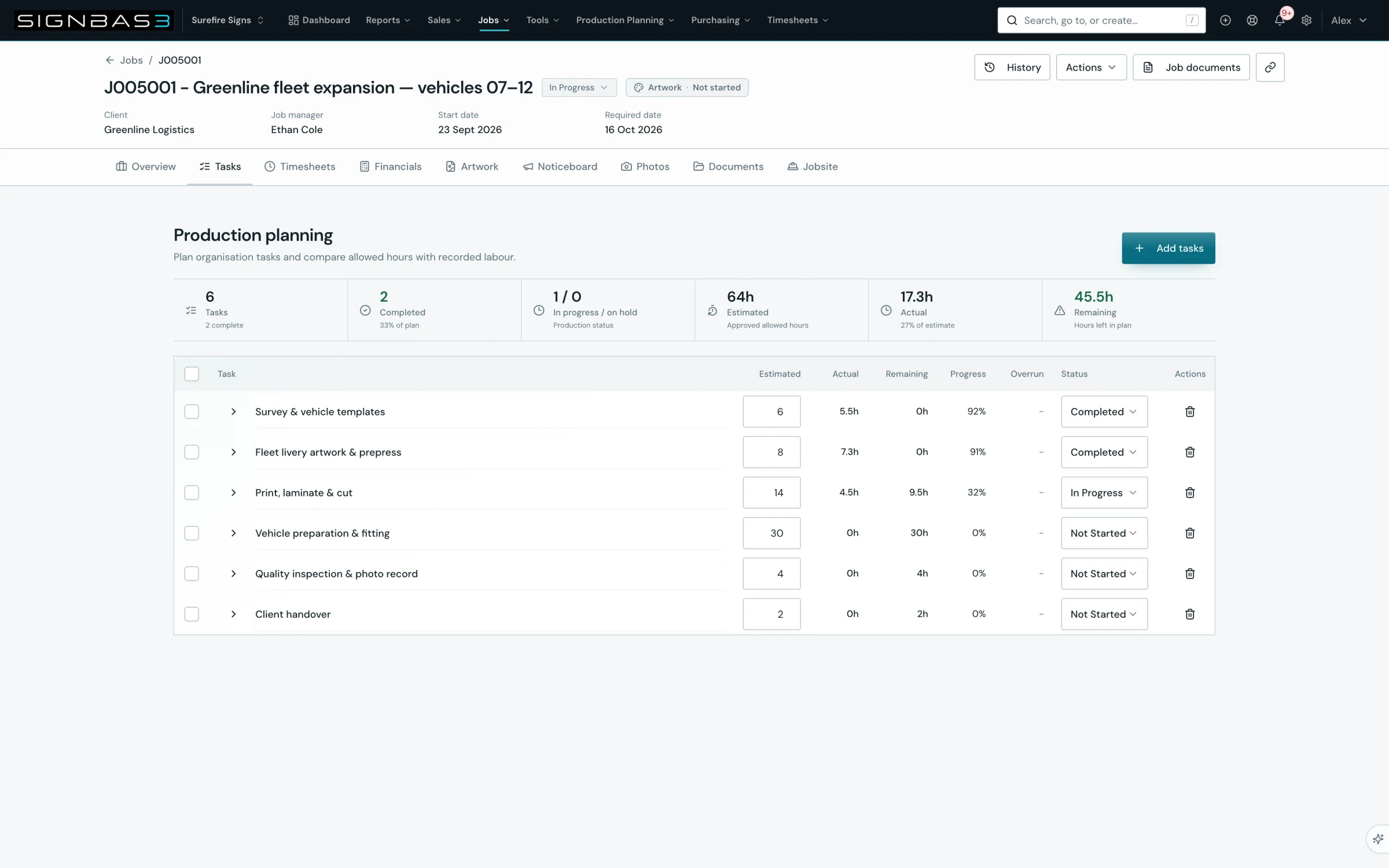
Live job workspace
See the commercial brief, current stage and delivery work together.
Production status that means something
Use stages your workshop recognises, backed by owned tasks.
A complete trail
Follow changes, files, correspondence and costs back to the job.
A practical workflow
What it looks like in use.
- 01 · Start from accepted work
Carry the client and agreed scope into delivery.
- 02 · Plan the work
Set ownership, tasks, dates and required production stages.
- 03 · Run the job
Update progress where the work happens and keep blockers visible.
- 04 · Close it properly
Finish with actual time, supplier spend and invoicing on record.
The core operating record
Run the sign job, not a collection of disconnected handoffs.
A sign job can cross sales, design, prepress, print, fabrication, finishing, suppliers, subcontractors, installation and accounts. SignBas3 keeps the commercial brief and the delivery evidence together so each department can continue the work without reconstructing it from email, whiteboards or private spreadsheets.
The job starts with what the customer accepted. It carries the current artwork decision, production plan, required purchases, site information, progress, files, costs and correspondence. When the work is complete, management can compare the accepted estimate with the real operational result.
See the complete sign-shop workflow → · Explore production management →
What sign shop job management software should keep together
| Job question | What the team needs | SignBas3 connection |
|---|---|---|
| What did the customer approve? | The current quote revision, products, dimensions, materials, labour allowances, delivery requirements and accepted value. | The agreed commercial scope remains attached when the quote becomes a job. |
| Which artwork can we produce? | The latest proof, customer comments, requested changes and the exact version approved for production. | Artwork versions, markup and approval history stay with the job instead of an email thread. |
| What happens next? | Current status, owned tasks, priority, remaining effort, dates, dependencies and visible blockers. | The live job workspace connects production stages with the tasks that move the work forward. |
| Are the inputs ready? | Materials, supplier work, purchase orders, receipts, files, site information and other production gates. | Purchasing and receiving remain job-linked so the workshop can see why work is ready or waiting. |
| What does the installer need? | The current site, contacts, scope, documents, photos, items, appointment and completion requirements. | Field teams receive the useful part of the same job and return progress and evidence to it. |
| Did the job perform? | Accepted revenue beside actual labour, materials, supplier costs, production evidence, installation and invoicing. | Job costing explains the margin using records created while the work was delivered. |
From quote to completed work
Keep the job recognisable at every stage.
- 01 · Accept the commercial scope
Carry the customer, site, current quote revision, sold products, specifications, price and delivery commitment into the operational job.
- 02 · Prepare artwork and production
Control proof versions and approval, then break the agreed work into design, print, fabrication, finishing, quality and installation tasks.
- 03 · Clear material and information gates
Raise required purchases, receive supplier inputs and expose missing files, decisions or site details before they stop the workshop.
- 04 · Schedule executable work
Plan tasks around current readiness, remaining effort, people, team capability, equipment context, existing bookings and fixed installation dates.
- 05 · Update the live job
Record progress, status, time, production evidence, files, correspondence and exceptions where the work happens.
- 06 · Install and complete
Give the crew the current site context and bring completion notes, photos, items and field activity back to the job.
- 07 · Invoice and learn
Close the commercial loop with invoicing, supplier cost and estimated-versus-actual reporting, then use the result to improve the next estimate.
Jobs versus a production board
A board shows position. The job explains the work.
A visual board is useful for seeing which stage a job has reached, but the card alone cannot preserve the complete operational story. The team still needs the accepted scope, approved proof, production tasks, purchased inputs, site details, files, costs and decisions that explain what should happen next.
SignBas3 connects the board position to the underlying job. Managers can see the portfolio while the people doing the work can open the detail, act, and leave a current record for the next department.
Explore sign production scheduling → · Explore artwork approval →
Manage different sign jobs without losing one operating model
Repeat banners, vehicle wraps, illuminated cabinets, fabricated lettering, wayfinding programs and national installation projects do not follow identical routes. SignBas3 lets tasks, products, suppliers, files, statuses and schedules describe the work each job needs while preserving one consistent commercial and operational record across the business.
A simple repeat job can move quickly. A complex manufactured sign can pass through design, engineering, purchasing, fabrication, electrical assembly, quality and installation. Both remain understandable in the same system without forcing the entire company into the lowest-common-denominator workflow.
Test job management software with a real sign job
- Choose work with a revised estimate, several artwork versions, purchased material, multiple production stages and an installation.
- Ask sales to hand the accepted work to production without a side email or spreadsheet.
- Confirm artwork and the workshop can identify the approved version and exact sold scope.
- Raise and receive a supplier order against the job, then check that readiness and cost remain visible.
- Change a priority or installation date and confirm the current plan and responsible people can respond.
- Complete production and field work, invoice the customer and explain the final margin from evidence on the job.
Connected around the job
Use the business systems your teams already know.
Choose Xero, MYOB or QuickBooks for accounting handoff while SignBas3 retains the operational detail required to run and cost the job. Choose Google Drive or Dropbox for job documents and photos so office, production and field teams work from a dependable file structure.
Questions sign shop owners ask
Is job management the same as production scheduling?
No. Scheduling places work across time, people and capacity. Job management also preserves the customer, accepted scope, artwork, tasks, materials, purchases, files, field evidence, costs and decisions that make the schedule meaningful.
Can a job include both production and installation?
Yes. The same job can carry design, print, fabrication, finishing and quality work into the final delivery or site-installation path, with current documents and completion evidence available to the field team.
Can SignBas3 show estimated versus actual job cost?
Yes. The accepted commercial baseline can be compared with actual labour, purchasing, materials, production evidence, installation and invoicing so management can understand margin and variance.
Does the job connect with accounting and storage?
Yes. Approved financial handoffs connect with Xero, MYOB or QuickBooks, while job documents and photos can use Google Drive or Dropbox.