
Manage job variations
Record changed scope separately from the accepted baseline, obtain the required approval and carry only approved value into invoicing.
Step by step
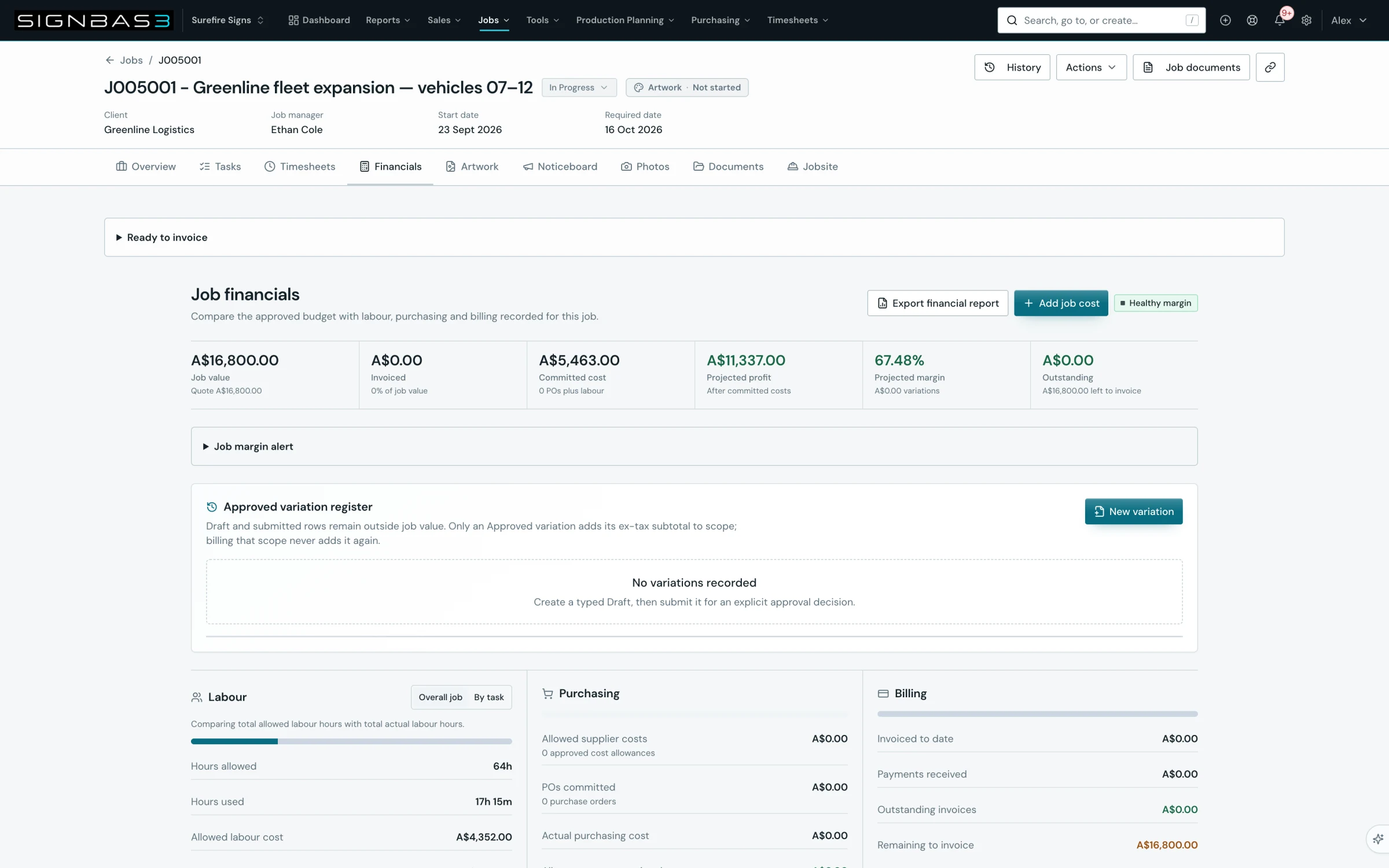
- Open the job, select the Financials tab and scroll to the Approved variation register beneath the financial KPIs.
- Select New variation; the Create variation Draft dialog opens in the job currency.
- Enter the Variation number, a Title and a Description that explains why the scope changed and what the client receives.
- Under Variation lines, set Type, Description, Quantity, Unit price and Tax rate (%) for each line, using Add line for more; the Ex tax, Tax and Total preview update as you type.
- Select Save Draft; the toast Variation Draft saved appears and the variation is listed with the status Draft.
- Use Edit saved Draft for corrections, then select Submit for approval and confirm with a Submission note.
- Record the decision with Approve scope, Reject or Cancel variation and a Decision reason; on approval the Job value KPI now includes the variation.
- To bill it, open the job's draft invoice, tick the lines under Approved variation scope remaining in Edit invoice draft, then select Save and approve.
Good practice
Raise the variation the moment the customer asks for the change, before anyone starts the work. A Draft costs nothing and stays outside Job value, so recording it early gives production and accounts a shared, numbered reference while the customer decides.
Before you begin
- The job exists and has a transaction currency saved.
- The accepted quote or original commercial baseline is visible on the job Overview.
- The organisation has agreed who may approve a variation.
Complete workflow
How the workflow moves
- 01Identify
Describe work outside the accepted baseline as a Draft variation.
- 02Price
Add typed lines with quantity, unit price and tax.
- 03Approve
Submit the Draft and record Approve scope, Reject or Cancel with a reason.
- 04Bill
Select the approved variation lines on a draft invoice.
Screen reference
What you will see
What this controls
Once a quote is accepted, the job scope is locked; the job Overview labels it Quoted scope locked · use Variations. The Approved variation register on the Financials tab is where every change to that scope is recorded as its own numbered record with typed lines and a lifecycle: Draft, Submitted, then Approved, Rejected or Cancelled.
Only an Approved variation adds its ex-tax subtotal to Job value, and it does so exactly once. Draft and Submitted rows remain outside job value. The approved amount then appears as Approved variation scope remaining when you build an invoice, separate from quoted lines and invoice-only items.
Before you start
- You need job write access to create and submit a variation, and the approval decision should be made by whoever your business authorises to change the commercial baseline.
- The job must have a transaction currency. If it does not, the register shows Save the job transaction currency before creating a variation and New variation is disabled.
- Have the customer's request, email or purchase order to hand so the Description records the evidence.
Walkthrough
1. Open the register
Open the job at /jobs/:id and select the Financials tab. Beneath the KPI strip sits the Approved variation register. A new job shows No variations recorded with the prompt Create a typed Draft, then submit it for an explicit approval decision.
2. Start a Draft
Select New variation. The Create variation Draft dialog opens and confirms the job currency and that the Draft does not affect approved job value until a separate approval decision.
3. Describe the change
Enter the Variation number (up to 80 characters, for example V-001), a Title such as Additional site works, and a Description of why the scope changed and what the client receives. Variation number and Title are required.
4. Add typed lines
Under Variation lines each line has a Type of Labour, Material, Subcontract, Freight or Other, a Description, a Quantity greater than zero, a Unit price labelled with the job currency and a Tax rate (%) that defaults from the job. Select Add line for more lines and Remove line to drop one; at least one line must remain. Each line shows its Ex tax, Tax and Total beneath its fields. The variation must have a value greater than zero.
5. Save the Draft
Select Save Draft. If a line is incomplete the dialog reports the problem, for example Line 1 description is required or Variation value must be greater than zero. On success the toast Variation Draft saved appears and the register lists the variation with its number, a Draft badge, Revision 1, the title, description, Ex tax, Tax and Total, and a table of its lines. Expand Approval and lifecycle evidence to see the Revision, Submitted, Approved and Closed stamps and the event timeline.
6. Edit and submit
While the row is Draft you can select Edit saved Draft to reopen the dialog and Save Draft changes, or Cancel variation to close it with a reason. When the Draft is ready select Submit for approval. The dialog explains that this writes a new immutable lifecycle event and pre-fills the Submission note with Submitted for approval. The status changes to Submitted and the toast Variation submitted recorded confirms it.
7. Record the decision
A Submitted variation offers Approve scope, Reject and Cancel variation. Each opens a dialog that requires a Decision reason; Approve scope also states the ex-tax amount it will add to approved job scope exactly once. On approval the toast Variation approved recorded appears, the badge reads Approved, the Approved stamp records who approved it and when, the Job value KPI detail becomes Quote value plus the variation total, and Projected margin shows the variation total in its detail line.
8. Bill the approved scope
Create or open the job's draft invoice. In Edit invoice draft the lines are grouped as Invoice-only items, Approved variation scope remaining, Quoted line items, Costs and Labour / tasks. Each variation row shows Approved, Issued and Remaining amounts. Tick Include on the variation line, keep its value within the remaining approved amount, then select Save draft or Save and approve. A Variation / Extra Works invoice cannot be approved until at least one remaining approved variation line is selected.
What changes elsewhere
- The Job value KPI on /jobs/:id/financials shows the detail Quote plus the variation total once a variation is approved.
- The draft invoice at /invoices/:id offers the approved amount under Approved variation scope remaining and tracks Issued and Remaining as invoices are approved.
- The job Overview at /jobs/:id keeps the original quoted scope locked; the variation is visible in the Financials register rather than as an edited line.
- The Projected margin KPI on /jobs/:id/financials shows the approved variation total in its detail line.
Common problems
| Symptom | Cause | Fix |
|---|---|---|
| New variation is disabled | The job has no transaction currency | Save the job currency on the job, then return to Financials. |
| Variation value must be greater than zero | Every line has a zero unit price or quantity | Enter a positive Quantity and Unit price on at least one line. |
| Record a reason for this decision | Decision reason is empty on Approve scope, Reject or Cancel | Type the reason; it is stored in the lifecycle evidence. |
| Variation billing needs review | An issued variation invoice has a missing or inconsistent register link | Review the listed invoice IDs with Accounts before issuing further variation invoices. |
Check your work
- The variation shows an Approved badge and the Approved stamp names the approver and time.
- The Job value KPI detail reads Quote plus the variation amount.
- Approval and lifecycle evidence shows the Submitted and Approved stamps and the status changes in order.
- The draft invoice lists the variation under Approved variation scope remaining with the full approved amount remaining.
If your workspace behaves differently, record the relevant job, client or record number and raise a support ticket so the team can investigate the exact context.