
Plan tasks and production stages
Break an approved sign job into template or custom tasks with estimated hours, track each task's status and remaining hours, and hand the plan to Scheduler and timesheets.
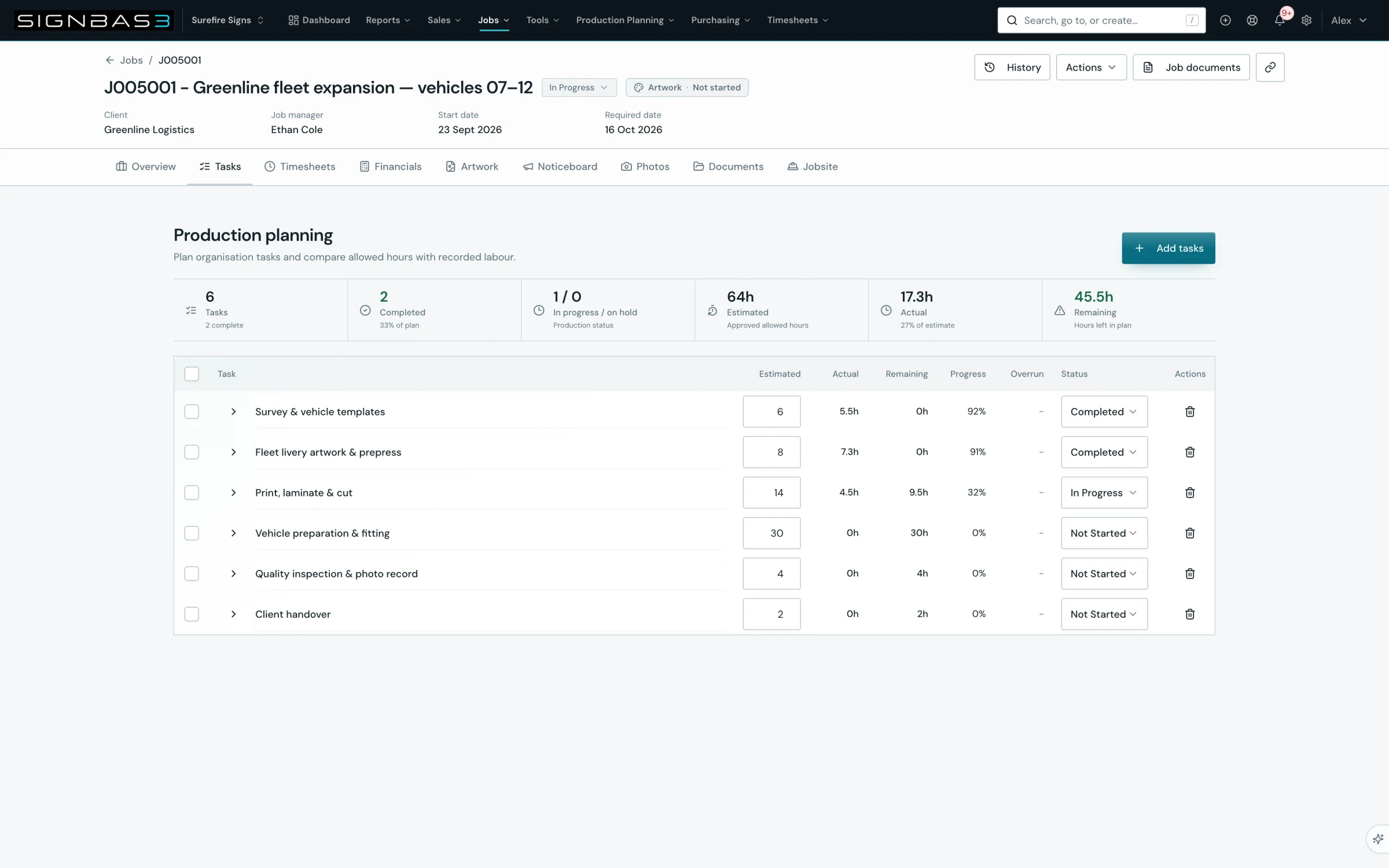
Step by step
- Open the job and select the Tasks tab; the Production planning panel loads with its labour summary cards and the task table.
- Select Add tasks to open the dialog.
- For a one-off stage, enter Task name and Estimated hours under Custom task, then select Add custom task.
- For standard work, use Search task templates, tick each template you need, adjust its Estimated hours, then select Add selected; or select Add all available to add every template not yet on the job.
- Change each task's Status as work moves through Not Started, Ready, In Progress, Waiting or Blocked to Completed.
- Expand a task to record Notes and read its Assigned staff and Recent timesheets.
- Read Estimated, Actual, Remaining, Progress and Overrun for each task and in the summary cards; an Over budget badge marks tasks past their allowance.
- Remove a wrong task with its Remove action, or tick several and select Remove selected, then open Scheduler to book the remaining hours.
Good practice
A useful task has a clear name, realistic estimated hours and an observable finish. Use the job status for the overall stage of the job and the task status for the work inside it, and keep estimates in quarter hours so the Remaining column stays a number the workshop believes.
Before you begin
- A job exists with an approved scope and required date.
- An Owner or Admin has configured the organisation task catalogue under Settings > Job Tasks.
Complete workflow
How the workflow moves
- 01Decide the stages
Agree which production stages the job needs and how many hours each should take.
- 02Add tasks
Add organisation templates or custom tasks with estimated hours from the job's Tasks tab.
- 03Run the work
Move each task through its status and keep notes as production progresses.
- 04Read the plan
Compare estimated, actual and remaining hours, then book remaining hours in Scheduler.
Setup dependency
Settings that change this workflow
The same task can behave differently between organisations. Check these settings before treating a different result as an error.
/settings/job-tasksSupplies the active task templates, default hours and departments offered in Add tasks.
Open in SignBas3 →/settings/capacity-planningMaps task templates to capacity departments so remaining hours appear as department demand.
Open in SignBas3 →Screen reference
What you will see
What this controls
Tasks are the production plan of a job. Each task carries estimated hours, a status, notes and a running comparison of allowed hours against recorded labour. Scheduler books staff against the task's unallocated remaining hours, timesheets are logged against the task, and the job's Timesheets and Financials tabs roll the task hours up into labour cost. Without tasks there is nothing to schedule and nowhere for time to land.
Before you start
- Confirm the approved scope and required date so the task list matches what was sold.
- Ask an Owner or Admin to maintain the organisation task catalogue under Settings > Job Tasks. Only active templates appear in Add tasks, and templates already on the job are not offered again.
- Decide the estimate for each stage in quarter hours. SignBas3 rounds every estimate to the nearest 0.25 h and requires a value above zero.
Walkthrough
1. Open the Tasks tab
Open the job and select Tasks in the Job workspace tabs; on a phone or tablet choose Tasks from the Job view selector. The panel is headed Production planning. Six summary cards follow: Tasks, Completed, In progress / on hold, Estimated, Actual, and Remaining, which becomes Overrun when actual hours exceed the estimate. A new job shows No production tasks are planned for this job yet.
2. Open Add tasks
The dialog is headed Add tasks, with Custom task on the left and Task templates on the right. The button is unavailable if the task list failed to load; select Try again first.
3. Add a custom task
Enter Task name and Estimated hours, then select Add custom task. SignBas3 responds Enter a custom task name if the name is empty and Enter estimated hours greater than zero if the hours are missing. The task is created with the status Not Started and its remaining hours equal to the estimate, and the dialog closes.
4. Add tasks from templates
Search task templates filters the catalogue by name, description, code or department, and the line beneath reports Showing X of Y available templates and how many are selected. Tick templates one at a time or use Select shown. Each row carries its own Estimated hours, pre-filled from the template default, which you can change before adding. Review selected shows only the ticked rows; Show catalogue returns to the full list. Add selected creates the ticked templates and Add all available adds every template not already on the job. SignBas3 confirms with Task added or the number of tasks added, or reports Selected tasks are already on this job when nothing new was created.
5. Change task status
The Status list on each row offers Draft, Not Started, Ready, Waiting, In Progress, Blocked, Completed and Cancelled. Choosing Completed sets Progress to 100% and treats the estimate as the completed hours; any other status recalculates Progress from actual hours against the estimate. Tasks with recorded time and no explicit status display as In Progress. Completed and Cancelled tasks no longer appear in Scheduler's task list.
6. Expand a task
The chevron beside the task name expands the row. Notes saves when you leave the field. Assigned staff lists the people scheduled on the task or reads Unassigned; Recent timesheets counts the time entries logged against it. The task name and Estimated hours are edited in place on the row and save when you leave the field.
7. Read the hours
Estimated is the allowance you entered, Actual is recorded timesheet time, Remaining is the estimate less actual hours, and Progress is actual against estimate. Overrun shows hours above the estimate and the row gains an Over budget badge. The summary cards repeat the same figures for the whole job.
8. Remove tasks and move to Scheduler
Remove on a row deletes that task straight away, without a confirmation; ticking rows shows Remove selected for several at once. Rows marked Job-level time are time records without a planned task and cannot be edited or removed. When the plan is right, open Scheduler and book each task's remaining hours to named staff.
What changes elsewhere
- Scheduler: each task with remaining hours appears in the task list for its job on /staff-scheduler, labelled with its remaining hours.
- My Timesheet and Team Timesheets: the Job task list in Log time offers these tasks on /my-timesheet and /timesheets.
- Job Timesheets tab: Hours by task compares estimated, actual, remaining and filed hours per task on /jobs/:id/timesheets.
- Job Financials: task hours feed labour cost on /jobs/:id/financials.
- Capacity Reporting: remaining hours on department-mapped tasks count as demand on /capacity-planning.
Common problems
| Symptom | Cause | Fix |
|---|---|---|
| No organisation task templates available | The catalogue is empty, or every active template is already on this job. | Add a custom task, or ask an Owner or Admin to add templates under Settings > Job Tasks. |
| A template reads Unnamed task template | The template has no usable display name. | Rename it under Settings > Job Tasks before adding it. |
| Production tasks are unavailable | The task list could not be loaded. | Select Try again. |
| The task does not appear in Scheduler | It is Completed or Cancelled, or has no unallocated remaining hours. | Reopen the status or raise Estimated hours. |
| A row cannot be edited or removed | It is Job-level time, a time record without a planned task. | Review the entry on the job's Timesheets tab instead. |
Check your work
- The Tasks card count equals the number of stages the job needs and the Estimated card equals the hours you agreed.
- Every task shows the intended status and a Remaining figure the workshop can act on.
- Opening Scheduler and choosing the job lists each open task with its remaining hours.
- Selecting Log time on My Timesheet and choosing the job lists the same tasks under Job task.
If your workspace behaves differently, record the relevant job, client or record number and raise a support ticket so the team can investigate the exact context.