
Record personal and team timesheets
Log your own hours against the right job and task in My Timesheet, then review and approve the team's pending entries in Team Timesheets.
Step by step
- Open My Timesheet from the top navigation; the heading shows your name and the seven-day pay week, with the Week summary beneath it.
- Choose the week with Week starting or the previous and next arrows.
- Select Log time to open the entry form.
- Set Date, choose the Assigned job and the Job task, enter Hours and add Notes; open Advanced options for Start time, End time, Break (minutes) and Billable.
- Turn on Keep open for multiple entries when logging a full day, then select Add entry; each new row shows Pending.
- Use the row's edit and delete actions to correct a pending entry before it is approved.
- As an Owner or Admin, open Team Timesheets, choose the week and read Team summary to see who has pending entries; select a day total or the person's name to open their week.
- Switch to Entries, set Status to Pending, tick the entries and select Approve, or use the row's actions menu to Approve one at a time.
Good practice
Log time at the end of each task or day rather than reconstructing the week on Friday, and always pick the task you actually worked on; hours roll up to that task on the job, so a wrong task quietly moves cost between stages.
Before you begin
- Your user account is linked to an active staff profile.
- You are assigned to the job, directly or through your staff group, and the job has saved tasks.
Complete workflow
How the workflow moves
- 01Log your time
Open My Timesheet, choose the week and add an entry per job task per day.
- 02Check the week
Read the Week summary and correct any pending entry before it is approved.
- 03Review the team
An Owner or Admin opens Team Timesheets, finds pending entries and approves them.
Setup dependency
Settings that change this workflow
The same task can behave differently between organisations. Check these settings before treating a different result as an error.
/settings/labour-ratesSets the cost context applied when approved time reaches job financials.
Open in SignBas3 →/settings/job-tasksDefines the reusable tasks that appear in the Job task list when time is logged.
Open in SignBas3 →Screen reference
What you will see
What this controls
A time entry records who worked, on which date, on which job task, for how many hours, and whether the time is billable. Every staff member logs and checks their own week on My Timesheet; an Owner or Admin reviews the team, approves entries and prepares payroll on Team Timesheets. Approved entries feed actual hours on the job's Tasks and Timesheets tabs and labour cost on its Financials tab.
Before you start
- If My Timesheet shows No staff profile found, your user account is not linked to an active staff profile; ask an admin to link it.
- Time can only be logged against jobs assigned to you or your staff group; being scheduled in Scheduler adds you to a job's staff.
- If the Job task list reads No job tasks are available for this job yet, ask production to add tasks on the job's Tasks tab.
Walkthrough
1. Open My Timesheet
The page is headed My timesheet with your name and the week's dates. The Week summary shows Total, Billable and Approved hours, plus Awaiting approval as a count of pending entries; a seven-day strip shows each day's total.
2. Choose the week
Week starting accepts any date and snaps to the first day of your organisation's pay week (Monday unless changed under Pay week starts on Team Timesheets); the arrows move seven days.
3. Open Log time
Log time opens a dialog headed Log time whose first line reads Logging time for followed by your name; entries on My Timesheet are always your own.
4. Complete the entry
Date defaults to today when today is inside the selected week, otherwise to the week's first day. Assigned job lists the jobs assigned to you. Job task loads the saved tasks for that job. Hours offers quick buttons for 0.25h, 0.5h, 1h, 2h, 4h and 8h, or type a value in quarter-hour steps. Notes is optional. Advanced options reveals Start time, End time, Break (minutes) and the Billable switch.
5. Save one or many
Keep open for multiple entries leaves the dialog open after each save and clears only Hours and Notes. Add entry saves with the confirmation Time entry added. SignBas3 will not save without a date, hours, an assigned job, or a job task when the job has tasks (see Common problems).
6. Correct a pending entry
The table lists Date, Job, Step, Hours, Status and Notes. Status reads Pending until an Owner or Admin approves it, then Approved. Edit time entry opens the same form and saves with Update entry; Delete time entry asks Delete this time entry? and offers Keep entry or Delete entry; deleting also removes the time from the linked job totals. Both actions are unavailable once the entry is Approved.
7. Review the team
Team Timesheets is headed Team timesheets. Pay week starts sets the seven-day week used by every timesheet. Review time is the default workspace; Payroll export prepares approved entries for Xero. The summary shows Total, Approved, Billable and Awaiting approval for the current filters; Selected week or Recent switches between one week and the latest entries. Team summary lists each person with a Status of pending or ready counts, or Clear, and a total per day. Selecting a day total or the person's name opens their week, where an Owner or Admin can edit any entry, including approved ones.
8. Approve entries
Entries lists every entry with Date, Staff, Job, Task, Hours, Billable, Approval, Xero and Notes. Filter by Staff, Status (All, Pending, Approved or Xero ready) and Task, or search staff, job or notes. Tick entries to show the selection bar and select Approve; SignBas3 confirms how many were approved. The row's actions menu offers Edit (headed Adjust timesheet entry), Approve or Unapprove, and Delete. Add entry opens Add timesheet entry with a Staff member list so an admin can log time on someone's behalf.
What changes elsewhere
- Job Tasks tab: Actual and Remaining hours update for the chosen task on /jobs/:id/tasks.
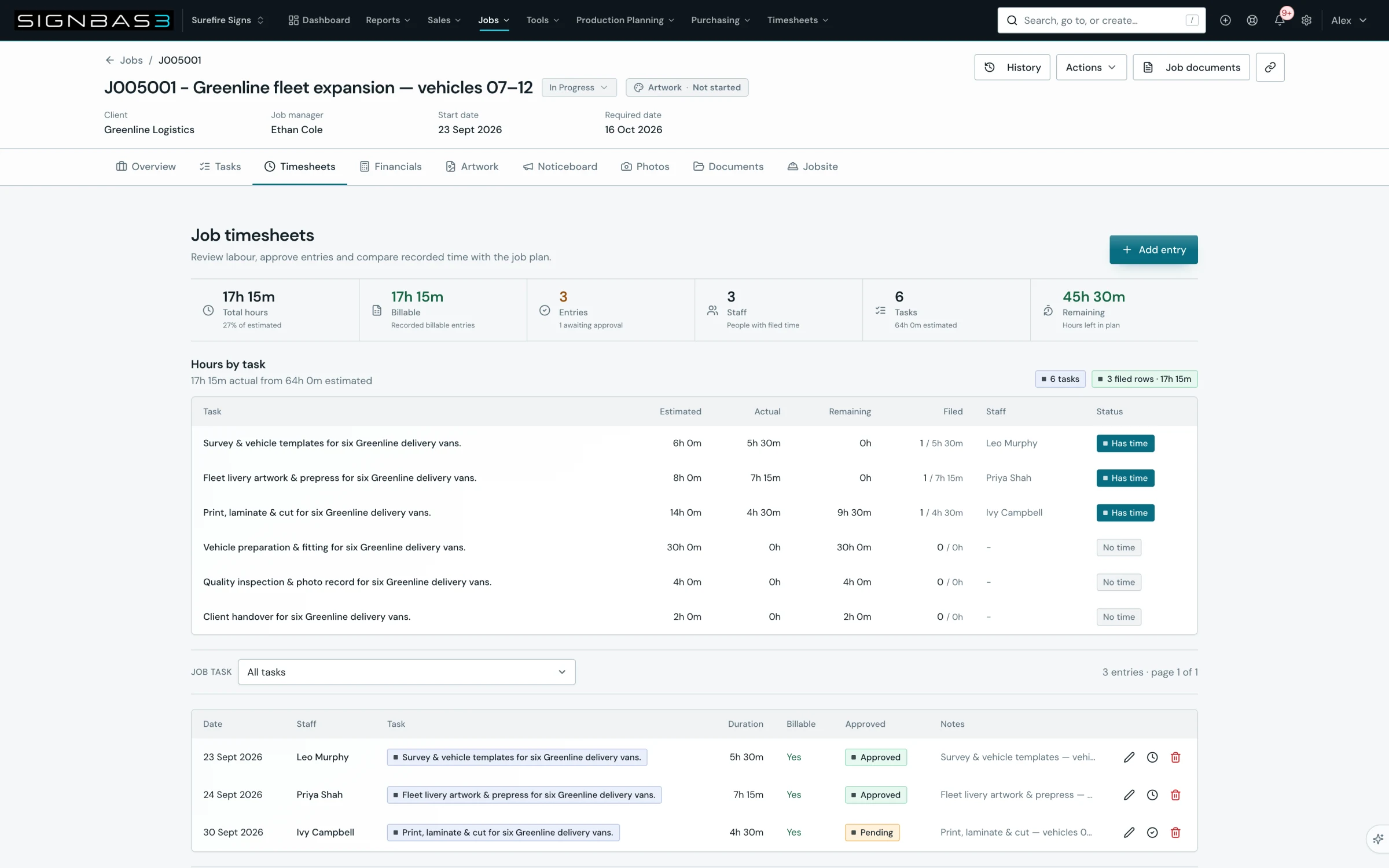
- Job Timesheets tab: the entry appears under Hours by task and Hours by staff on /jobs/:id/timesheets.
- Job Financials: approved hours contribute labour cost on /jobs/:id/financials.
- Team Timesheets: approval moves the Xero column from Not ready to Ready on /timesheets.
- Scheduler: recorded time counts in the capacity figures on /staff-scheduler.
Common problems
| Symptom | Cause | Fix |
|---|---|---|
| No staff profile found | Your user account is not linked to an active staff profile. | Ask an admin to link your user account to an active staff profile. |
| Assigned job list is empty | No jobs are assigned to you or your staff group. | Ask production to schedule you on the job or add you to its staff. |
| No job tasks are available for this job yet | The job has no saved tasks. | Ask production to add tasks on the job's Tasks tab. |
| Choose the date the work was done, or Enter how many hours were worked | Date or Hours is empty. | Enter both, then select Add entry. |
| Select a staff member and one of their assigned jobs | No job was chosen. | Choose the job from Assigned job. |
| Select the job task you worked on | A job with tasks was chosen but no task was selected. | Choose the task from Job task. |
| Edit and delete are unavailable on a row | The entry is Approved. | Ask an Owner or Admin to Unapprove or adjust it from Team Timesheets. |
Check your work
- Week summary Total equals the hours you worked, and Awaiting approval is zero once the week is approved.
- Each row names the correct job, and the Step badge matches the work you did.
- Team summary on Team Timesheets shows Clear against each person for the approved week.
- The job's Tasks tab shows the logged hours under Actual for the task you chose.
If your workspace behaves differently, record the relevant job, client or record number and raise a support ticket so the team can investigate the exact context.