
Use the staff scheduler
Book saved job tasks onto named staff by day and start time, adjust committed blocks, and read planned hours against weekly capacity.
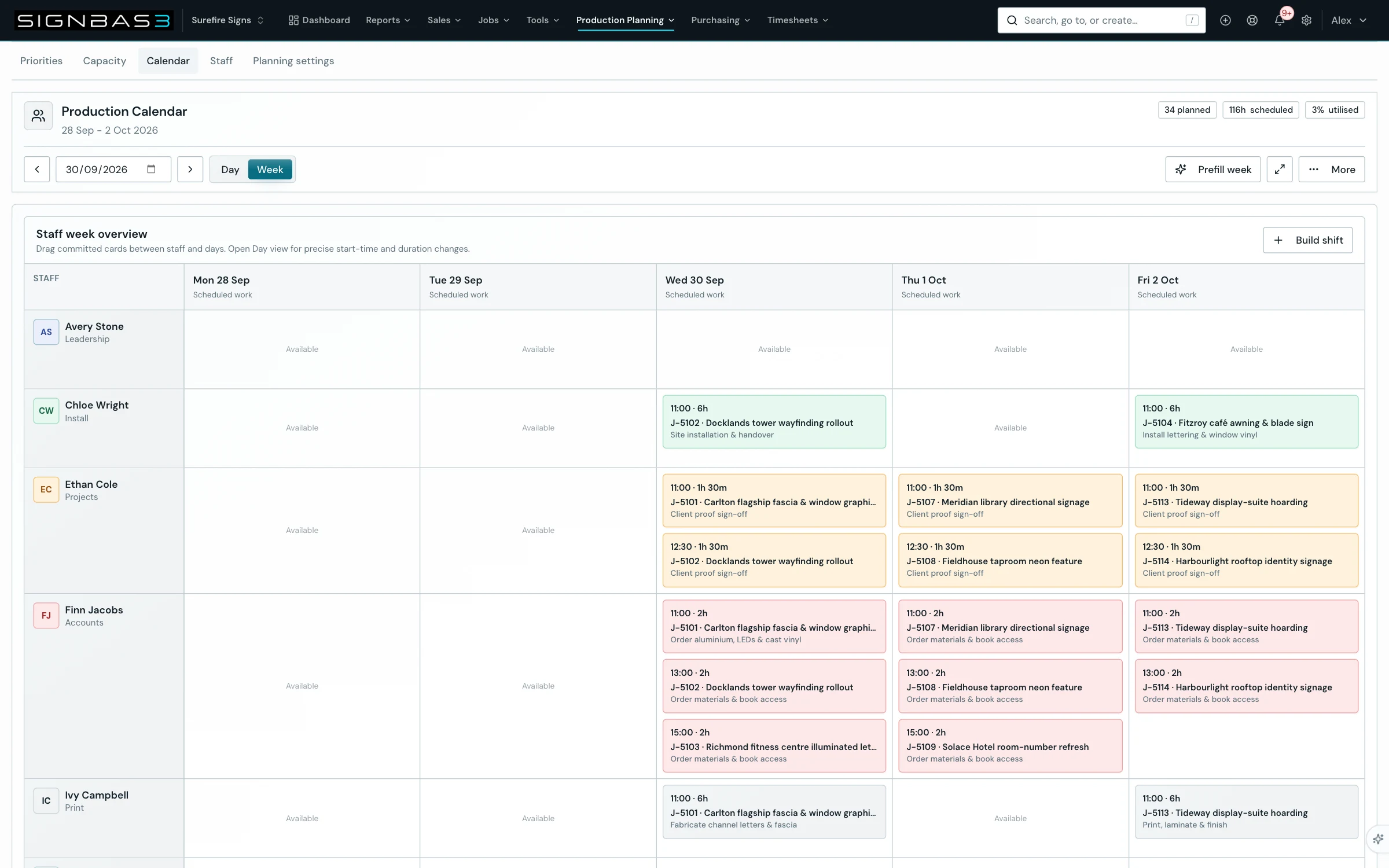
Step by step
- Open Scheduler with an Owner, Admin or Manager account; the page opens on the current Monday-to-Friday week.
- Set the period with Schedule date or the arrows, choose Day or Week, and read the planned, scheduled and utilised badges.
- Select Build shift in the Staff week overview, then use Search staff and All capacity departments to find the person.
- Open the person's card, choose the job in the Client | Job list and the task beneath it; the card shows Unallocated remaining and its badge changes to Ready.
- Set the block length with the 30-minute minus and plus buttons, then drag the bubble onto the person's day cell in Week view or onto the time grid in Day view.
- Select any committed card to open Schedule assignment details and use Move start, Duration, Add staff member, Notes, Duplicate next day or Delete entry.
- Drag committed cards between staff and days in Week view, or up and down the Day grid, using the edges to change start and finish.
- To fill a week automatically, select Prefill week, then Build draft week, review the drafts and Apply or Discard draft.
- Open More to Print schedule, Share schedule, Export report, Open in calendar, Download calendar file or Clear week.
Good practice
Schedule the constraint first. Book the fabrication or installation specialist whose hours decide the week before filling everyone else, and keep each block within the task's unallocated remaining hours so the allowed and overtime badges stay honest.
Before you begin
- An Owner, Admin or Manager account.
- Jobs that already carry saved tasks with estimated hours.
- Staff profiles with Show in scheduler switched on, either on the staff profile under Settings > Users and Staff or under Settings > Production Planning > Staff.
Complete workflow
How the workflow moves
- 01Choose the period
Open Scheduler, set the date and pick Week or Day.
- 02Build a shift
Pick a person, a job and a saved task, set the duration and drag the bubble onto the calendar.
- 03Adjust committed work
Open a block to change start, duration, staff and notes, or drag it between staff and days.
- 04Share the plan
Print, share or export the week, then read the utilisation badge before the production meeting.
Setup dependency
Settings that change this workflow
The same task can behave differently between organisations. Check these settings before treating a different result as an error.
/settings/capacity-planningDecides which staff appear, their weekly hours, capacity departments and scheduler visibility.
Open in SignBas3 →/settings/job-tasksSupplies the reusable task names and default effort behind the tasks the scheduler can book.
Open in SignBas3 →Screen reference
What you will see
What this controls
Scheduler turns a job's saved tasks into committed blocks of time for named people. Each block records who, which job, which task, start, finish and planned minutes against the task's remaining hours; the header badges add the blocks up against weekly capacity. A person scheduled onto a job also joins its assigned staff, so the job appears under Assigned job on My Timesheet.
Before you start
- Sign in as an Owner, Admin or Manager; other roles do not see Scheduler.
- Give every job at least one saved task with estimated hours on its Tasks tab; only tasks that are not Completed or Cancelled and still have unallocated hours are offered.
- Switch Show in scheduler on for the people you need, on the staff profile under Settings > Users and Staff or under Settings > Production Planning > Staff.
- The Day grid runs from 07:00 to 17:00 in 30-minute slots, and a bubble dropped in Week view starts at 07:00.
Walkthrough
1. Open Scheduler
The heading reads Staff Scheduler with the period beneath it. A desktop opens in Week view, Monday to Friday, with each person's department under their name and Available in every empty cell; a phone opens as a Day agenda. If Staff schedule unavailable appears, select Try again.
2. Set the period and read the badges
Schedule date accepts any date; the arrows move one day in Day view and seven in Week view. Utilised shows a dash while capacity is still loading.
3. Open Build shift and find the person
In Week view, Build shift opens the tray on the left; in desktop Day view it is always open. Search staff matches names, emails and departments, and each card shows the person's department priority order, or No capacity department priority, and hours available/week.
4. Choose the job and task
Select the card to expand it. The Client | Job list is alphabetised by client. The task list reads Choose job first, then Choose task with each task labelled by its remaining hours; No saved job tasks means nothing is bookable. Choosing a task shows Unallocated remaining beside Selected and turns the badge to Ready.
5. Set the duration and drag the bubble
The duration starts at the task's remaining hours rounded to 30 minutes, capped at eight; the buttons move it in 30-minute steps between 30 minutes and ten hours. Drop the bubble on a day cell in Week view or at a start time on the Day grid; SignBas3 confirms with Scheduled, the name and the start time. On a phone in Day view, set Start time and select Add to the day's agenda instead.
6. Adjust a committed block
Selecting a card opens Schedule assignment details, showing the planned duration, the allowed hours, and an overtime badge when planned exceeds allowed. Move start and Duration each shift by 30 minutes. Add staff member books another person onto the block. Notes saves when you leave the field. Duplicate next day copies the block to the next day. Delete entry asks Delete this schedule block? and removes it with Delete block; logged time is unaffected.
7. Move work between staff and days
In Week view drag a committed card into any other staff and day cell; SignBas3 confirms with Moved, the task, the new person and the day. In Day view drag the card to change its start, or its top or bottom edge to change start or finish; cards beyond their allowed hours show an OT badge there.
8. Prefill the week
Prefill week opens the Weekly schedule automation panel. Once a workspace administrator has enabled the Workspace control toggle, Build draft week proposes review-only blocks from visible staff, weekly capacity and incomplete capacity-mapped tasks, using saved department priorities first. Drafts appear as dashed Fitch cards with a match percentage and are not saved until you select Apply; Discard draft removes them.
9. Share or clear the week
More prints the schedule, shares a text summary, exports a CSV report, and opens or downloads a calendar file for the visible period. Clear week (or Clear day) asks Clear this week? and names the number of committed blocks; unapplied drafts survive, but the removal is permanent.
What changes elsewhere
- My Timesheet: the scheduled person sees the job in Assigned job on /my-timesheet.
- Job Tasks tab: the expanded row's Assigned staff lists the people booked on /jobs/:id/tasks.
- Capacity Reporting: planned blocks and remaining task hours drive /capacity-planning.
- Production Planning: /settings/capacity-planning decides who appears and the utilised badge.
Common problems
| Symptom | Cause | Fix |
|---|---|---|
| No staff are available to schedule | No active staff have Show in scheduler enabled. | Select Open Staff & Access, or switch it on under Settings > Production Planning > Staff. |
| Task list shows No saved job tasks | Every task is Completed, Cancelled or fully allocated. | Add tasks on the job's Tasks tab, or raise the estimate on the task you need. |
| Block shows an OT badge | Planned minutes exceed the task's allowed hours. | Shorten the block with Duration, or raise the task's Estimated hours. |
| Build draft week is unavailable | Schedule prefill is switched off for the workspace. | Ask a workspace administrator to enable the Workspace control toggle. |
Check your work
- The planned badge matches the number of cards in the visible week.
- Each card shows the intended person, job, task, start and duration, with no unexpected OT badge.
- The job's Tasks tab lists the booked person under Assigned staff for that task.
- The scheduled person sees the job under Assigned job in Log time on My Timesheet.
If your workspace behaves differently, record the relevant job, client or record number and raise a support ticket so the team can investigate the exact context.