
Move an accepted quote into a job
Move an accepted sign quote into delivery while retaining approved scope, value, ownership and required dates.
Step by step
- Open the quote and confirm the status badge reads Issued or Accepted and the Job handoff row on the Overview tab reads Not converted.
- Choose Actions then Accept · Job preflight for an Issued quote, or Issue + accept · Job preflight for a Draft; the toast Quote accepted — review the job preflight appears and Create job opens.
- In Job details, confirm the Client, adjust the Job name, then set the Required date, Site address and Job status.
- Check Link existing work shows the quote under Existing quote.
- Expand Planning and ownership to set Client order number, Planned start, Job manager, Client manager, Priority, Payment arrangement, Freight required and Install required.
- Expand Timesheet access and tick the Quick-add job groups and Individual staff who may record time on the job.
- Add handover Notes, then select Create job; the toast Job followed by the new number created appears and the job Overview opens.
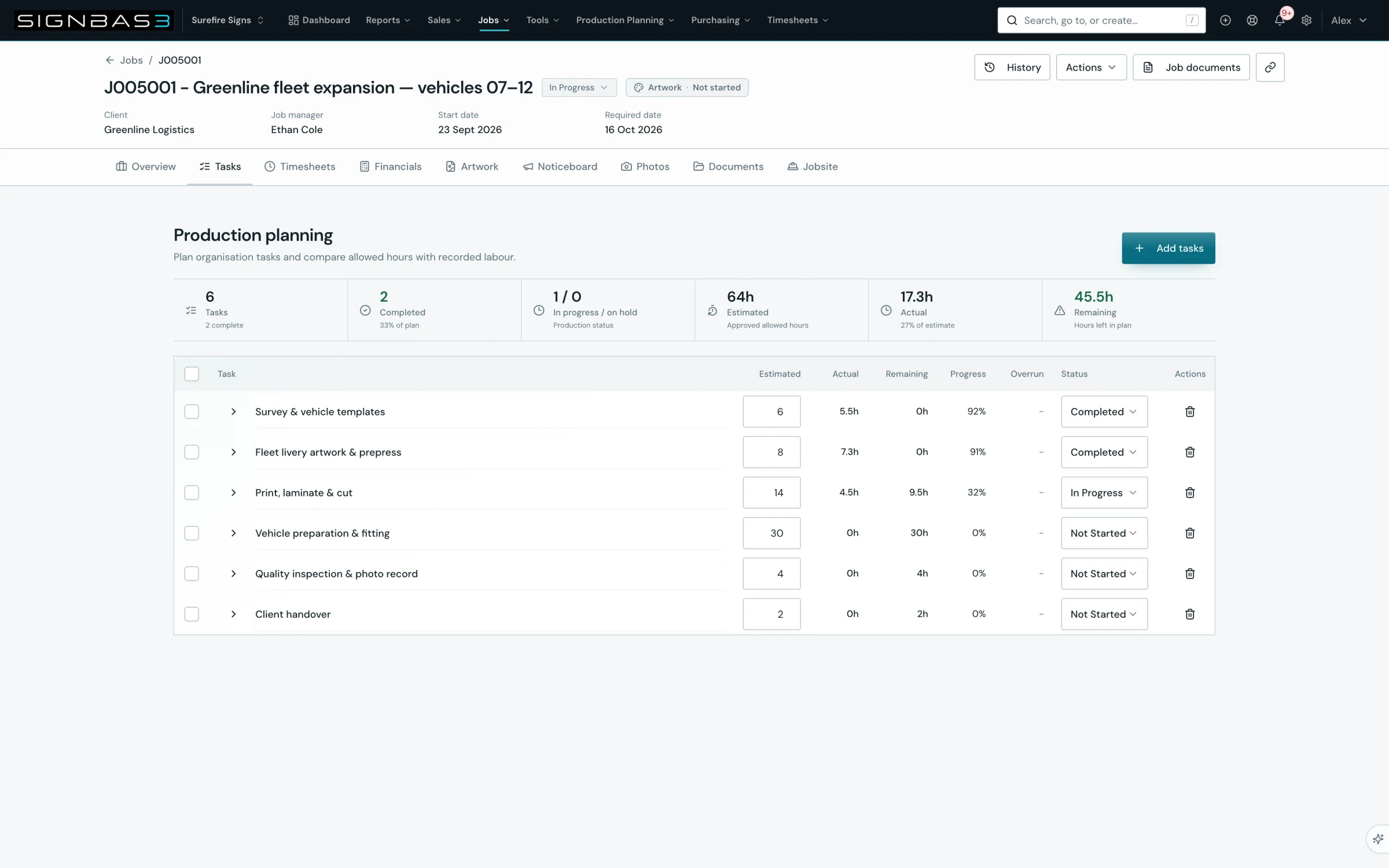
- Confirm Job scope lists the quoted lines with the badge Quoted scope locked · use Variations, then open Tasks and use Add tasks to plan production.
Good practice
Accept and create in one sitting, from the quote. The preflight form is pre-linked to the accepted quote and refuses to create a second job for it, so the cleanest handover is always quote detail, Accept · Job preflight, Create job.
Before you begin
- The quote is Issued or Accepted and its Job handoff row reads Not converted.
- At least one job status is configured in Settings.
- You know the required date, job manager and client manager for the work.
Complete workflow
How the workflow moves
- 01Accept
Record the customer decision from quote detail.
- 02Preflight
Complete the Create job form with the quote pre-linked.
- 03Create
Create the job and confirm the locked scope on its Overview.
- 04Plan
Add production tasks from the Tasks tab.
Setup dependency
Settings that change this workflow
The same task can behave differently between organisations. Check these settings before treating a different result as an error.
/settings/general/job-creationDecides whether Required date is mandatory on Create job and supplies priority and payment arrangement options.
Open in SignBas3 →/settings/job-statusesPopulates the Job status list; Create job stays disabled until a status is chosen.
Open in SignBas3 →/settings/job-custom-fieldsAdds organisation fields under Custom fields on the job Overview.
Open in SignBas3 →Screen reference
What you will see
What this controls
Job preflight is the controlled step between a customer saying yes and production starting. Accepting the quote locks it as the commercial baseline. Creating the job from that acceptance links the two records, so the job Overview shows the quoted scope as locked, the Financials tab reports the quote value as Job value, and any later change must be recorded as a variation rather than by editing the accepted lines.
Before you start
- You need quote write access to accept and job write access to finish the preflight.
- Check Settings for job statuses. Create job stays disabled while the Job status list shows No job statuses configured.
- Decide the required date. When Settings > General > Job Creation requires a job due date, the field is marked with an asterisk and the job cannot be created without it.
- Client manager defaults from the manager recorded on the client; choose the Job manager on the form.
Walkthrough
1. Confirm the quote is ready
Open the quote at /quotes/:id. The status badge should read Issued or Accepted. On the Overview tab, Quote details shows Job handoff; it reads Not converted until a job exists. If it already shows a job number, the handover has been done and Actions offers View job instead.
2. Accept and open the preflight
Choose Actions. For an Issued quote select Accept · Job preflight. For a Draft select Issue + accept · Job preflight, which opens the editor and runs save, issue and accept in one action; the editor's Issue & accept button does the same. The toast Quote accepted — review the job preflight appears and SignBas3 opens /jobs/new with the quote id attached. While the quote loads the page shows Prepare job from quote. If the quote is already accepted and no job exists, Actions offers Job preflight to reopen this form; if a job already exists, SignBas3 opens that job.
3. Complete Job details
The Create job page shows Next number preview in its meta line and a Back to quote button. Under Job details the Client is filled from the quote and the Job name is pre-filled with the quote name. Enter the Required date, the Site address for installation or delivery, and choose a Job status from the configured list. The footer reads Complete the required job details to continue until these are done, then Ready to create this organisation job.
4. Check the linked quote
Link existing work is expanded automatically during a preflight. Existing quote shows the accepted quote by number and name, and the note explains that a linked quote carries its approved totals and sign details into the job. Leave it linked. Because a quote is linked, the manual Job line items section is hidden; the scope comes from the quote.
5. Set planning and ownership
Expand Planning and ownership. Record the Client order number from the customer's purchase order, a Planned start date, and choose the Job manager and Client manager from staff. Priority and Payment arrangement appear when your organisation has configured those options; choosing a payment arrangement that needs a deposit reveals Deposit percentage. Tick Freight required and Install required so dispatch and installation are visible on the job.
6. Set timesheet access
Expand Timesheet access. Tick Quick-add job groups to grant a whole team, or tick Individual staff. Members inherited from a group are marked Group; a person ticked directly and through a group shows Direct + group.
7. Add notes and create the job
Under Notes, add production details, handover information and site constraints. Select Create job. SignBas3 validates the form and shows the first missing item, for example Add a job name before creating the job. On success the toast reports the new job number and the job Overview opens at /jobs/:id.
8. Confirm the handover
On the job Overview, Job scope lists the quoted lines with the ex-tax value and the badge Quoted scope locked · use Variations. The At a glance section includes a Quote button back to the source quote. Open the Tasks tab, which shows Production planning, and select Add tasks to add a Custom task or pick from Task templates. The job's task plan is built here; the quote's Time allocation stays on the quote as the estimate reference.
What changes elsewhere
- The quote at /quotes/:id shows a Quote accepted panel with the job number, Job handoff links to the job and Actions offers View job.
- The Quotes register at /quotes shows the job number in the Job column and offers Open job in the row menu.
- The job Financials tab at /jobs/:id/financials reports Job value from the accepted quote and the Approved variation register starts at No variations recorded.
Common problems
| Symptom | Cause | Fix |
|---|---|---|
| Accept · Job preflight is missing from Actions | The quote is still a Draft | Use Issue + accept · Job preflight, or issue the quote first. |
| This quote is already linked to job | A job already exists for the quote | SignBas3 opens the existing job; continue there instead of creating another. |
| Job preflight unavailable | The quote could not be loaded for the preflight | Select Back to quote and retry; no job has been created. |
| Create job stays disabled | Client, Job name, Required date or Job status is missing | Complete the field; the footer text changes to Ready to create this organisation job. |
Check your work
- The quote shows Quote accepted with the job number and Job handoff links to the job.
- The job Overview shows the client, the expected job name, the required date and the chosen status.
- Job scope lists the quoted lines and reads Quoted scope locked · use Variations.
- The Financials tab reports Job value equal to the accepted quote value ex tax.
If your workspace behaves differently, record the relevant job, client or record number and raise a support ticket so the team can investigate the exact context.