
Revise and send a quote
Keep revisions and customer decisions connected to the commercial record.
Step by step
- Open the quote from Quotes; the detail page shows the status badge next to the quote name and a Locked badge for anything other than Draft.
- Check the Overview, Line items and Costing tabs, then select Document to preview the customer PDF in the document workspace.
- For a Draft, choose Actions then Edit quote, make the changes in the editor and select Save.
- For an Issued or Accepted quote, choose Actions then Create revision, enter the Reason for revision and select Create revision; the new Draft revision opens.
- When the Draft is final, choose Actions then Issue quote; the toast Quote issued appears and the status badge changes to Issued.
- Select Email, complete To, Subject and Message in the Send quote panel, then select Send email; the toast Email sent confirms delivery.
- Record the customer decision with Actions then Accept · Job preflight, or let the customer accept from the emailed quote link; open the History tab to review the locked versions.
Good practice
Issue before you send. An issued quote is locked, so the PDF in the customer's inbox always matches the version SignBas3 will accept and hand to production. If anything changes afterwards, create a revision with a plain-language reason.
Before you begin
- A saved quote exists with a client, contact and at least one line.
- An active Quote/Estimate document template is available to your organisation.
- Your organisation email identity is configured so quotes can be sent.
Complete workflow
How the workflow moves
- 01Review
Check the scope, totals and generated document on quote detail.
- 02Revise
Edit a Draft directly or create a revision of an issued quote with a recorded reason.
- 03Issue
Lock the version the customer will receive.
- 04Send
Email the PDF and secure quote link from the document workspace.
- 05Record the decision
Accept the quote in SignBas3 when the customer confirms.
Screen reference
What you will see
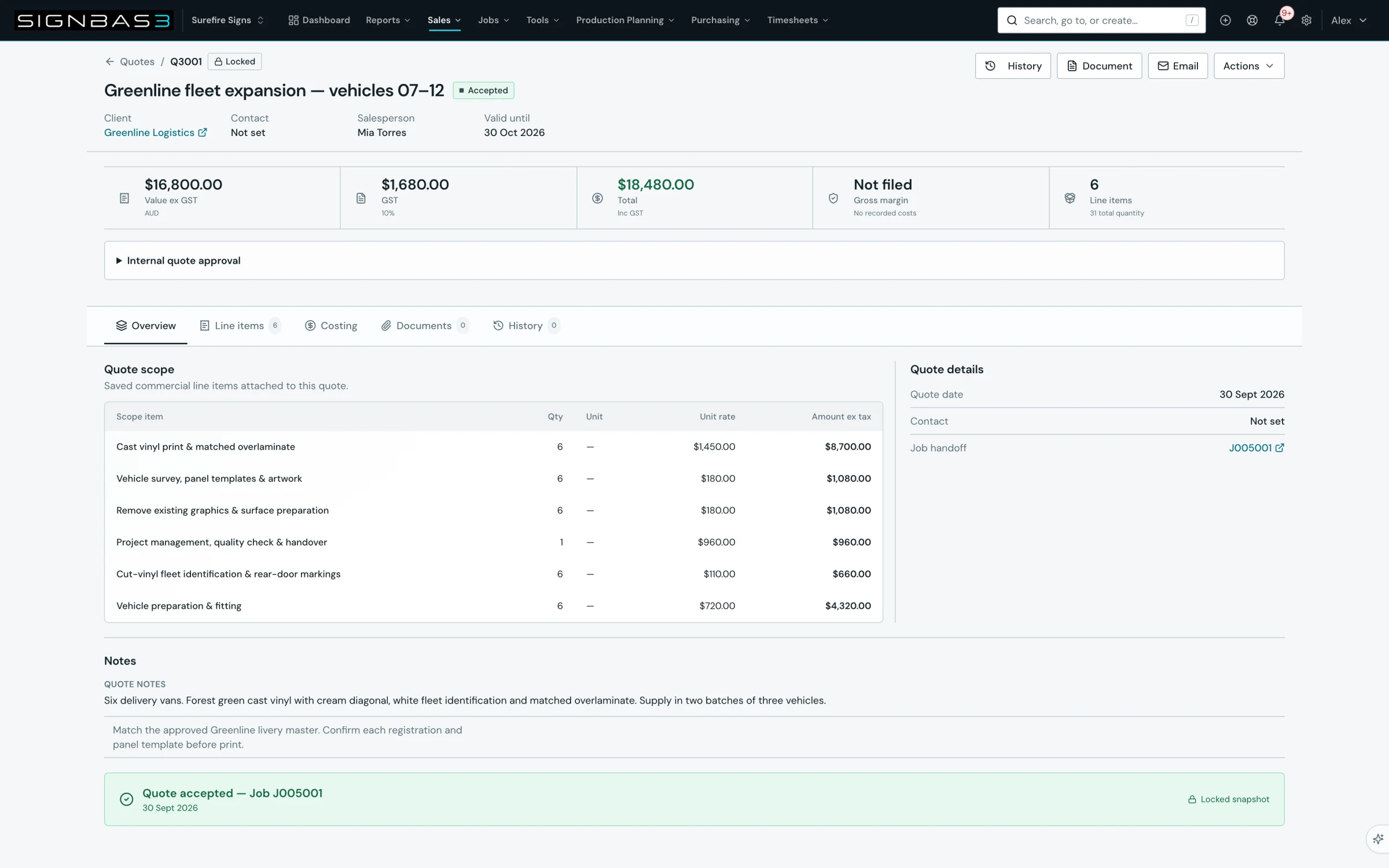
What this controls
The quote detail page moves a quote from a working Draft to an issued commercial offer, then to an accepted record a job can be created from. Issuing locks the version. A revision opens a new editable Draft under the same quote number and leaves the earlier version locked with the reason you record. Emailing sends the PDF and a secure link to the public quote page, where the customer can accept online.
Before you start
- You need quote write access to edit, issue, revise or accept.
- Confirm the Quote contact is the person who should receive the email; change it in the editor while the quote is a Draft.
- If the Document and Email buttons report No active templates, ask an Owner or Admin to activate a Quote/Estimate template.
Walkthrough
1. Open the quote and read its state
From Quotes, select Open quote. The header shows the quote number, name and a status badge (Draft, Issued, Accepted, Declined or Expired); anything other than Draft also shows Locked. Beneath the name are Client, Contact, Salesperson and Valid until. The KPI strip shows Value ex GST, tax, Total, Gross margin and Line items; the tabs are Overview, Line items, Costing, Documents and History.
2. Review the scope and the document
Overview shows Quote scope, Quote details (Quote date, Contact and Job handoff), Notes and Quote fields. Line items lists each row with Qty, Unit, Unit rate and Amount ex tax. Costing shows Internal costing (Sell, Cost, Margin and Margin %) and the Labour plan; neither reaches the client document. Select Document to open the document workspace at /documents/delivery: the PDF preview renders through the selected template, with Download PDF, Download Word and Print in the side panel.
3. Edit a Draft
Choose Actions and Edit quote. The editor opens at /quotes/:id/edit with the meta label Saved draft; change the lines, contact, validity or notes, then select Save. The toast Quote saved confirms the change. Copy quote creates a fresh Draft with its own number.
4. Revise an issued or accepted quote
Choose Actions and Create revision. The Create quote revision dialog explains that the new Draft uses the next /1, /2 suffix on the same quote number, that line totals are recalculated, and that the original stays locked and is superseded when the revision is issued. Enter the Reason for revision; Create revision stays disabled until you do. On success the toast Revision R1 created (or the next label) appears and the new revision's detail page opens; use Actions then Edit quote to change it.
5. Issue the final version
With the Draft complete, choose Actions and Issue quote. The toast Quote issued appears, the badge changes to Issued with Locked, and Edit quote leaves the Actions menu. An expired quote, or one whose totals need reconciliation, is refused with the reason shown. Issue + accept · Job preflight opens the editor and runs save, issue and accept in one go; the editor's Issue & accept button does the same.
6. Email the quote
Select Email on quote detail. The document workspace opens with the Send quote panel expanded; the current PDF is attached automatically. Complete To (one or more addresses), optionally Cc and Bcc, tick Send me a copy to receive the sent email, then check Subject, which defaults to Quote and the number, and Message. Send email is disabled until there is a recipient, a subject or message, and a generated document. On success the toast Email sent appears.
7. Record the decision
The email carries a secure link to the public quote page, which shows the Quotation, Quoted items, Notes, Terms & conditions and a Ready to accept? section with an Accept Quote button. Accepting asks for the customer's name and optional notes; the page then shows Approved with their name, the quote moves to Accepted in SignBas3 and the quote owner is notified. Expired or superseded quotes show a notice instead. To record the decision yourself, choose Actions then Accept · Job preflight: the toast Quote accepted — review the job preflight appears and Create job opens with the quote linked. The History tab shows Version history with each saved version, its Locked badge and status.
What changes elsewhere
- The Quotes register at /quotes shows the new status and, once a job exists, the job number.
- A revision is its own register row with the same quote number and a /1, /2 suffix; the source stays visible and locked.
- Accepting opens /jobs/new with the quote pre-linked; once the job exists, Job handoff links to it and Actions offers View job.
Common problems
| Symptom | Cause | Fix |
|---|---|---|
| Edit quote is not in Actions | The quote is Issued or Accepted and locked | Use Create revision and edit the new Draft. |
| Create revision stays disabled | Reason for revision is empty | Enter a short reason; it is stored with the version. |
| Document or Email is disabled with No active templates | No Quote/Estimate template is active | Ask an Owner or Admin to activate a template, then reload the quote. |
| Send email is disabled | No recipient, no subject or message, or the PDF has not generated | Add a recipient, keep the subject, and wait for the preview to finish before sending. |
| Accept · Job preflight is missing | The quote is still a Draft | Issue the quote first, or use Issue + accept · Job preflight. |
| The quote could not be issued | Valid until has passed or the totals need reconciliation | Create a revision, correct the validity or totals, then issue the revision. |
Check your work
- The status badge reads Issued or Accepted and the Locked badge is visible.
- The History tab lists the saved version, and any revision shows its suffix in the register.
- The Email sent toast appeared and the customer has the PDF and quote link.
- For an accepted quote, Job handoff on the Overview tab shows the job number or Actions offers Job preflight.
If your workspace behaves differently, record the relevant job, client or record number and raise a support ticket so the team can investigate the exact context.